The dinner planner the whole household has a say in

Dinner, decided together.

Everyone votes on the week's dinners, everyone can see whose turn it is to cook, and the shopping list builds itself from the meals you pick. Start from the dinners your household already rotates through — for families, couples and flatmates alike.

Everyone joins on their own device with a code. No ads. Free to start.
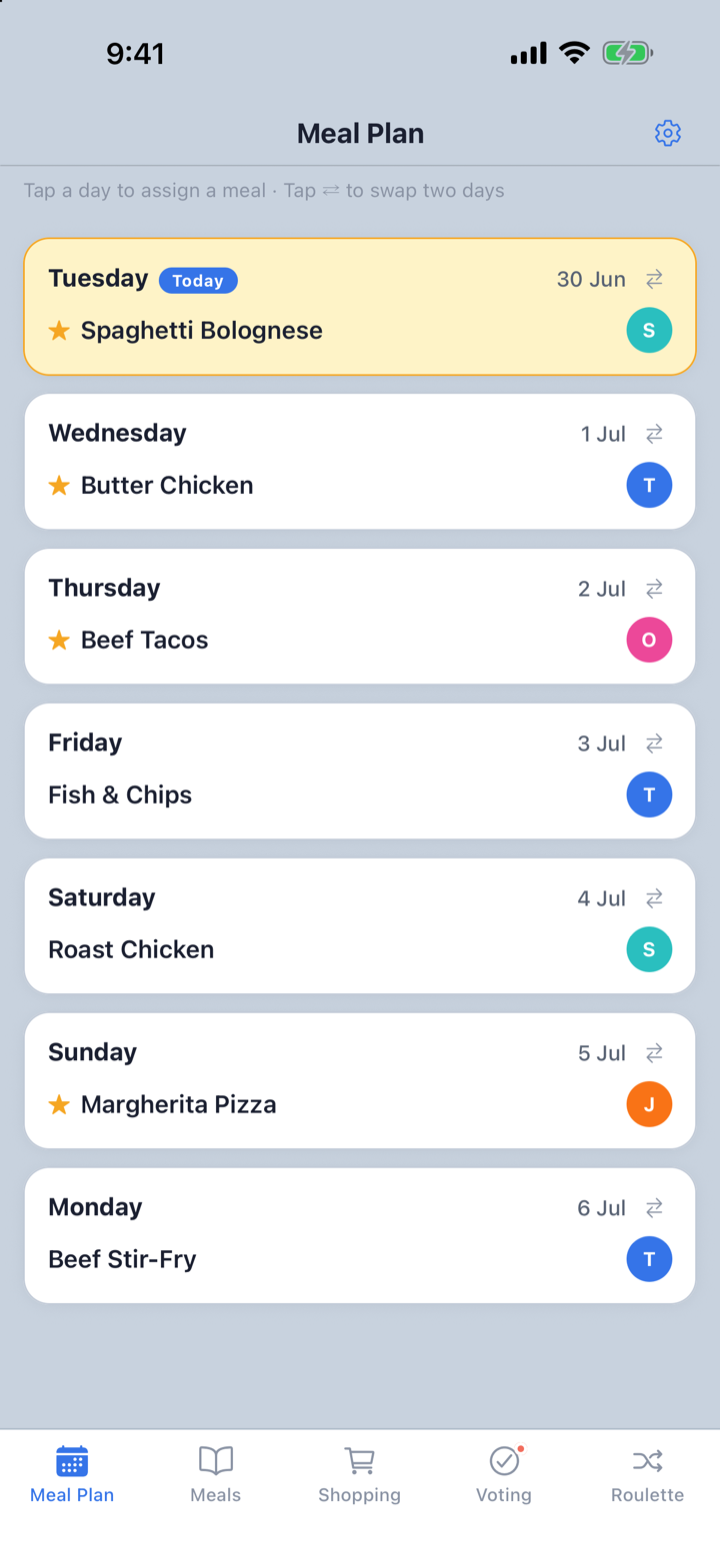
FamilyMeals weekly dinner plan — each night's meal and who's cooking
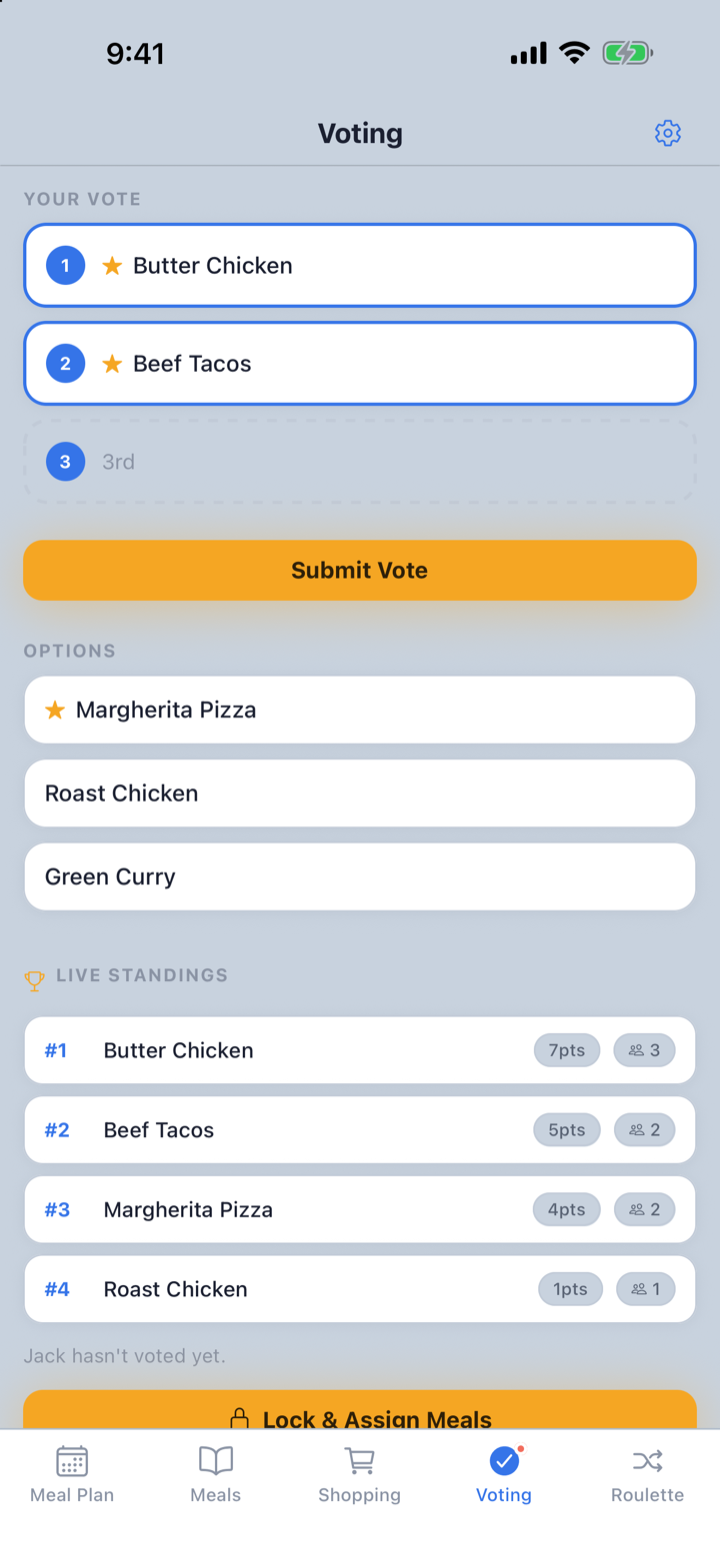
FamilyMeals voting screen — household members rank meals and live standings update

Plan the week together

One rolling 7-day dinner plan the whole household can see.

Everyone gets a vote

Members rank their top dinners, live across devices.

Shopping list builds itself

Ingredients from the plan flow into one shared list.

Know who's cooking

Assign each dinner so responsibilities are clear.

Still deciding "what's for dinner?" every night?

Someone has to think of a meal, check what everyone feels like, work out who's cooking, and remember what to buy — every single day. It's a small decision that quietly eats up the week.

FamilyMeals gives your household one shared place to decide together — and the shopping list builds itself.

From "what's for dinner?" to a sorted week.

Build a library of meals once, then plan each week together in minutes — voting, the plan and the shopping list all stay in sync.

01

Add your rotation once

Add the dinners your household actually rotates through, with their ingredients. Do it once — they're ready to reuse every week.

02

Get everyone on board

Share an invite code so each member joins on their own phone — or set up one shared household tablet.

03

Vote together

Start a vote and let everyone rank the meals they want this week — standings update live across devices.

04

Plan the week

Drop the winning meals onto the 7-day plan and assign who's cooking each night.

05

Shop & decide

The plan's ingredients become a shared shopping list — and roulette settles the nights no one can decide.

Multiple devices

Everyone's in — on their own device.

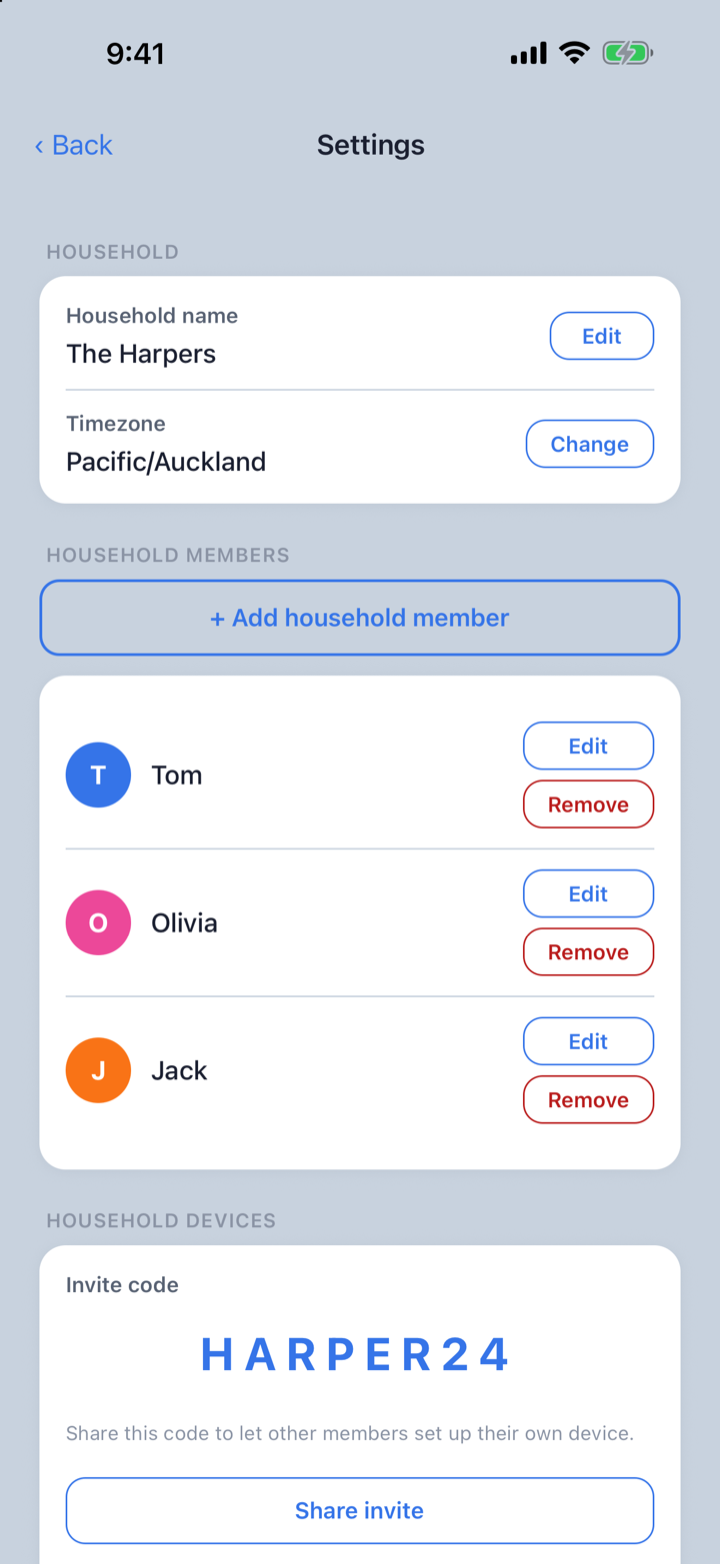
FamilyMeals works best when the whole household takes part. Share one invite code and each member joins on their own phone — or set up a shared tablet that everyone picks their name on. From there anyone can add meal ideas, vote, see the weekly plan and check the shopping list, all kept in sync.

  • Share a single invite code
  • Each member joins on their own phone
  • Or use one shared household tablet
  • Everything stays in sync, live
FamilyMeals household settings — invite code and members, each on their own device
Meal Plan

Dinner planning for the household.

A rolling seven-day dinner schedule everyone can see. Tap a day to assign a meal and show who's cooking — so the whole household knows what's happening tonight.

  • See the week's dinners at a glance
  • Assign who's cooking each night
  • Swap meals between days in a tap
FamilyMeals weekly plan — seven days of dinners with who's cooking each night
Voting

Everyone gets a vote.

Pick the meals your household wants this week. Anyone can start a vote; each member ranks their top three, and the standings update live across everyone's devices. Lock it in and the winners drop onto the plan.

  • Each member ranks their top three
  • Live results across devices
  • Lock in the winners and assign them
FamilyMeals voting — each member ranks their top meals and live standings update
Shopping List

Shopping list built from the plan.

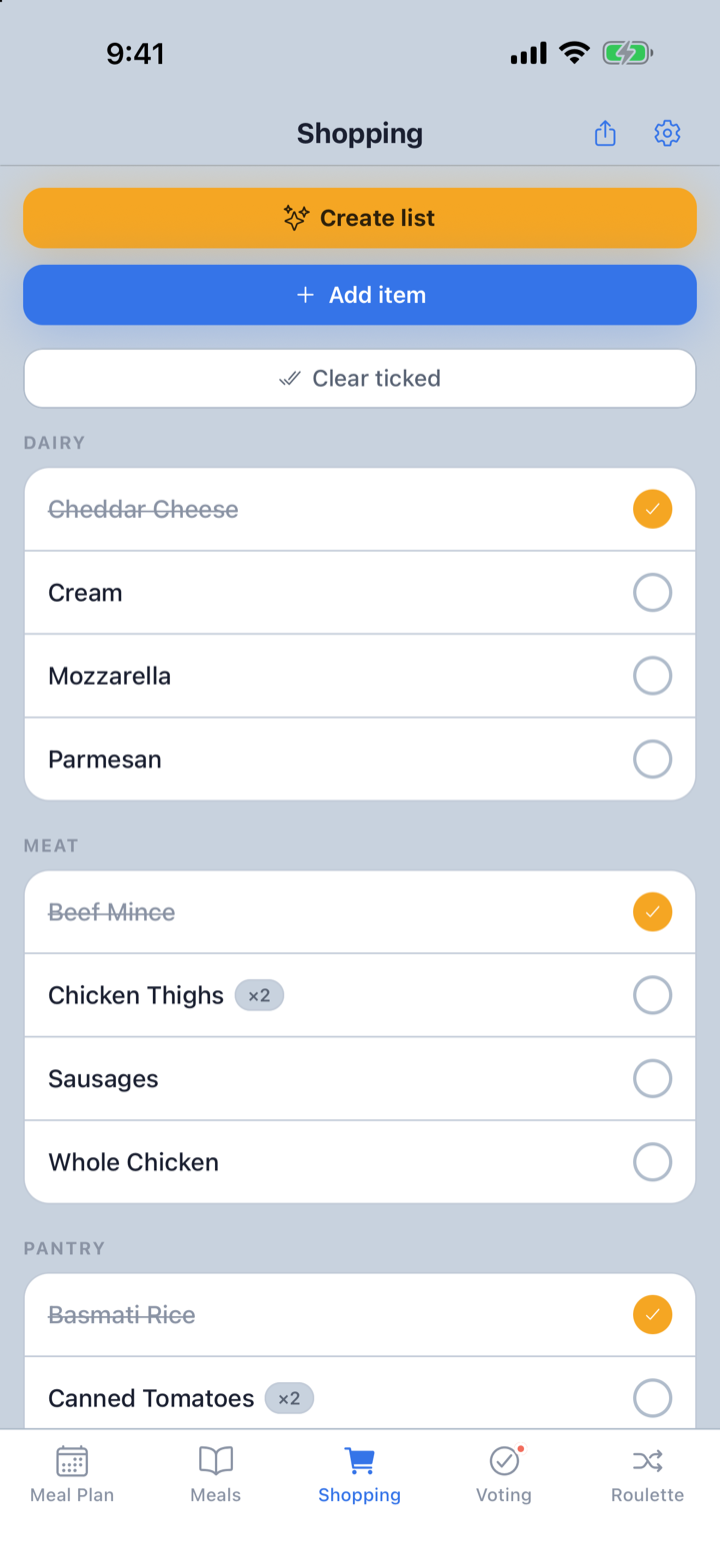
Ingredients from the dinners you've selected flow into one shared shopping list — so you shop from a single list instead of starting again each week. Add your own extras, and tick items off as you go.

  • Auto-built from the week's meals
  • Add manual items too
  • Tick off and share the list
FamilyMeals shopping list — ingredients from planned meals, grouped by aisle and tickable
Meals

Your dinner rotation, not a recipe catalogue.

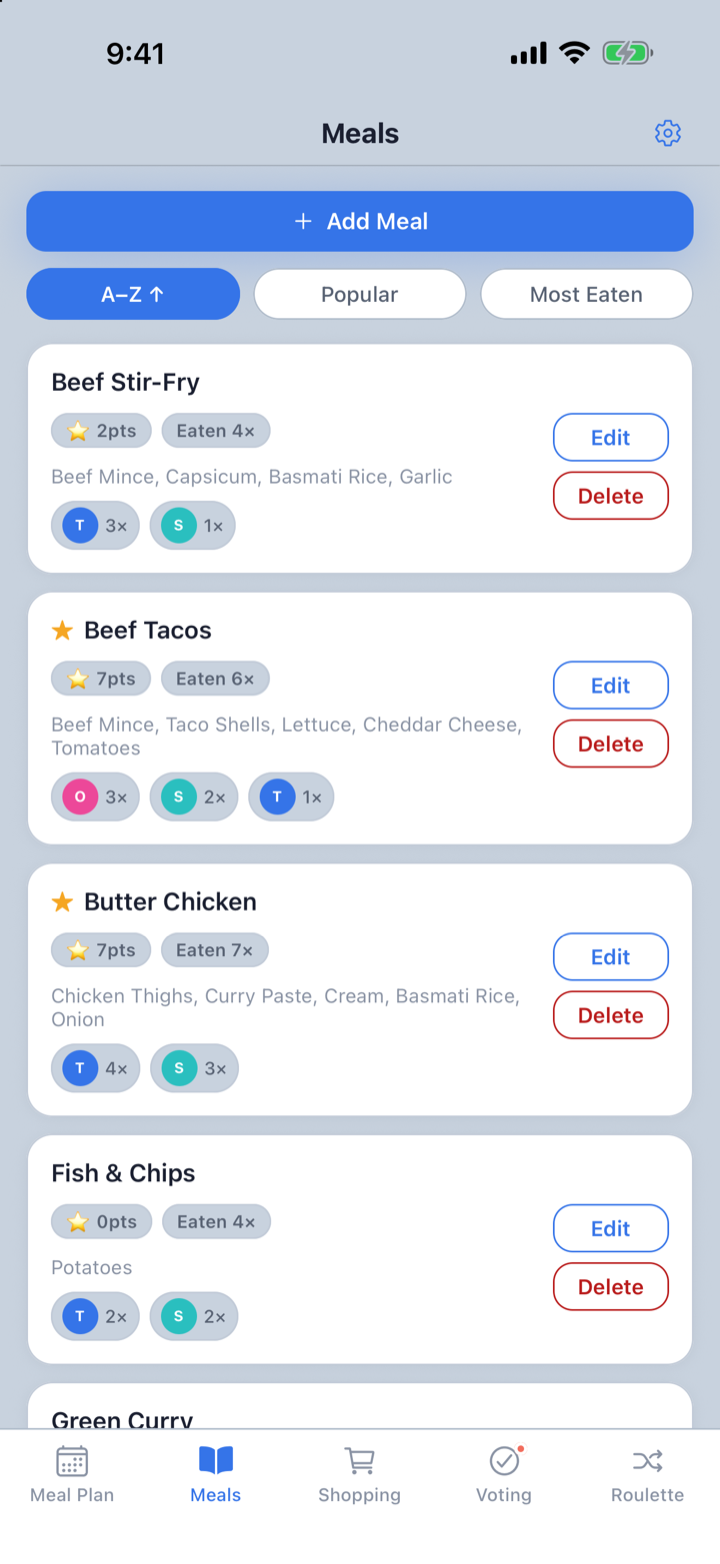
Most households cook the same 20–30 dinners on rotation. Add yours once — with their ingredients — and reuse them every week. No endless recipe feed to scroll, no blank page to start from.

  • Your regulars, all in one place
  • Add ingredients once, reuse every time
  • Star your Household Favourites for quick picks
FamilyMeals meals library — your household's regular dinners with vote scores and times eaten
Track & decide

See what gets picked — or spin for it.

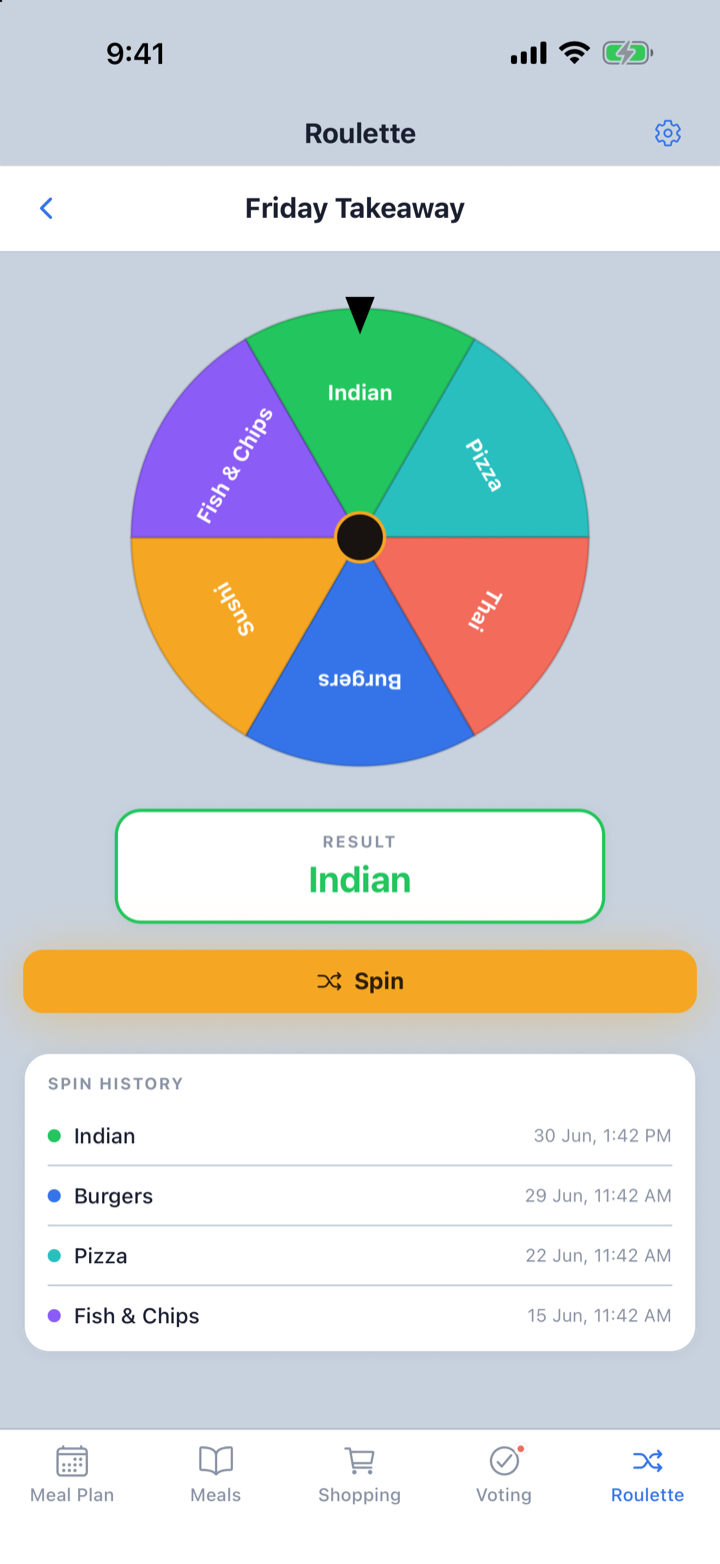
Over time, FamilyMeals shows which dinners win the votes, how often each meal gets eaten, and who's cooked it before. And for the nights no one can decide, spin the roulette to settle takeaway or any other call.

  • Track vote scores and times eaten
  • See who's cooked each meal
  • Roulette for "you decide" nights
FamilyMeals roulette — spin to settle takeaway or undecided nights

Not just recipes. Household dinner coordination.

FamilyMeals isn't a recipe-discovery app. No AI feed, no endless recipes to scroll — on purpose. It's built around the meals your household already knows and eats, so it answers the questions that actually come up each week: what are we eating, who's cooking, what do we need to buy, and what does everyone want?

Not another recipe app

It starts with the dinners your household already rotates through — not a feed of recipes to browse. Add them once, then just decide what to cook this week.

Not just a shopping list

Pick the meals, assign the cook, and the list builds itself from the ingredients saved against those dinners.

Not a solo planner

Made for households where more than one person has a say in dinner — everyone votes, not just whoever's cooking.

Made for every kind of household.

FamilyMeals uses neutral "household" and "member" language, so it fits however you share a kitchen.

👨‍👩‍👧‍👦

Families

Plan the week's dinners, let kids and teens help choose meals, and make who's-cooking clear.

💞

Couples

Agree the week's dinners together, skip the last-minute scramble and keep one shared shopping list.

🏠

Flatmates

Vote on shared meals, assign who's cooking and keep grocery planning in one place.

Busy households

Put the weekly plan somewhere everyone can see and cut the repeat "what's for dinner?" conversations.

Meal planning, answered

Who is FamilyMeals for?

Anyone who shares meals — families, couples, flatmates, roommates or any household that shares a kitchen. FamilyMeals uses neutral "household" and "member" language, so it works however your household is made up.

How does voting work?

Anyone can start a vote by choosing meals from your library. Each member ranks their top three (3, 2 and 1 points). Standings update live across everyone's devices, and the winning meals get added to the week's plan.

Where does the shopping list come from?

It builds itself from the plan. The ingredients linked to the dinners you've planned flow into one shared shopping list, so you shop from a single list instead of starting again each week. You can add manual items too.

Can the whole household take part?

Yes. Plan together across the household's devices — everyone can add meal ideas, vote, see the weekly plan and know who's cooking.

What is the roulette for?

For nights when no one can decide. Create a scenario such as "Takeaway tonight?", add your options, and spin the wheel for a random pick. Spin history is kept.

Is FamilyMeals free?

FamilyMeals is free to start, with an optional one-time upgrade for unlimited voting.

FamilyMeals is a family meal planner app for households that want a simpler way to plan weekly dinners. Use it as a weekly dinner planner, shared meal planner and grocery list builder in one — save your favourite meals, vote on dinner ideas, build a seven-day plan and turn it into a shared shopping list. Whether you're planning family dinners, meals for flatmates or a weekly menu as a couple, FamilyMeals makes dinner planning more collaborative and less repetitive.